


Machine translation
Synchra24 Extension Store: launching the beta version
Ready-made services, automation, and packages for your business' tasks. Get acquainted with the extensions on the website, choose a solution and connect it to your company in Synchra24.
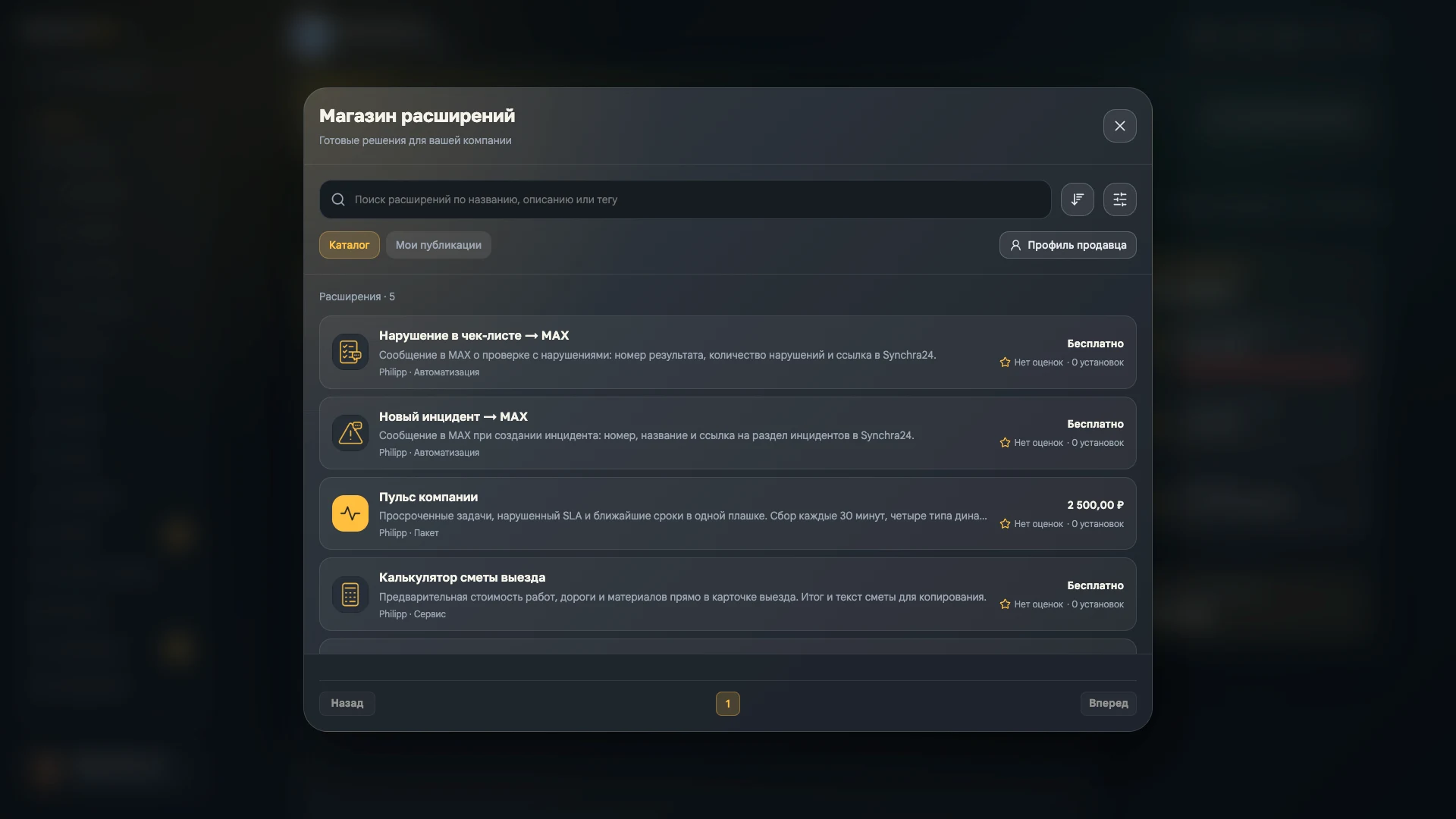
Each company has its own processes: someone needs to send notifications about violations in Telegram, someone needs to calculate the cost of departure, and someone needs to collect team indicators in one place. Now ready-made solutions for such tasks can be found in Synchra24 extension store. We are launching it in beta mode.
The store combines services, automation, and packages that complement Synchra24's capabilities. You can choose a suitable solution for your company or share your own development with other users.
From a task to a ready—made solution
There are three types of extensions in the catalog:
- Services — tools for individual work tasks.
- Automation — scripts that perform actions according to specified conditions.
- Packages — services and automation combined into one solution.
Among the first products — "Departure cost calculator", "Violation in the checklist → Telegram" and Pulse of the Company. They show how different the tasks that extensions can solve can be, from calculations and notifications to analytics.
See how everything works before installation
Catalog on the website it is open without registration. Use the search and filters by category, type, cost, and rating. Switch between tiles and the list — whichever is more convenient for you to choose.
The product profile contains information for choosing: who it suits, what task it solves, what it looks like in the screenshots, and what Synchra24 services are needed to work with. Information about the seller, version history, and license terms are also available here.
The store has free and paid extensions. The price is indicated on the card; if there is a "Price on request", check the conditions with the seller.
Connection — in your company Synchra24
Click "Open in Synchra24" in the card on the website. The web application will open the same product. If you haven't logged in to your account yet, log in first. You won't need to return to the catalog and search for the extension again. If the company has not been selected yet, the app will prompt you to select it from the available ones.
To access the store, you need the administrator rights of the selected company. Before installing, check the necessary services and subscription terms: the extension does not replace access to the Synchra24 features that it uses.
The free extension can be installed from the card. For a paid one, first arrange payment with the seller and receive the key, then activate it in the app. The key is valid for one company; no purchase is made on the website.
After installation, check the solution settings. Automations are set off — turn on the script when you have it ready to work.
Have you created a useful solution? Offer it to others
Authors of services and automations can publish their products in the store: fill out the seller's profile, provide a description, add images, specify requirements and license. Distribution can be free or paid.
New products and updates are moderated. Only approved published versions appear in the public catalog. This applies to both individual extensions and packages.
The instructions are already in the documentation
We have prepared Guide to the extension store How to find a product, check the requirements, install a free solution, activate a paid one, and publish your own development. It also describes how to work with keys, licenses, and updates.
The store operates in Beta mode: the catalog will be updated, and the interface and individual features may change. If you encounter an error, report it through the familiar Synchra24 support channel; questions about a specific product and its terms can be addressed to the seller.